> ## Documentation Index
> Fetch the complete documentation index at: https://guide.crypto-now.io/llms.txt
> Use this file to discover all available pages before exploring further.
# Set up auto-swap
> Create a per-account rule that automatically converts incoming crypto to the coin you want to hold, every time a wallet is topped up past a threshold.
Auto-swap turns one currency into another automatically. You set a rule once — *when this wallet receives at least \$X, convert it from coin A to coin B and send it here* — and CryptoNow runs the conversion on every qualifying replenishment, with no manual step. It's how you keep your treasury in a stable coin without watching wallets.
Rules are **per Account**, so set the **Account** toggle (top-right) to the account you want the rule on before you start.
Go to **Settings** (the gear in the left nav) and scroll to the **Auto swap** card. Click **Create new**.
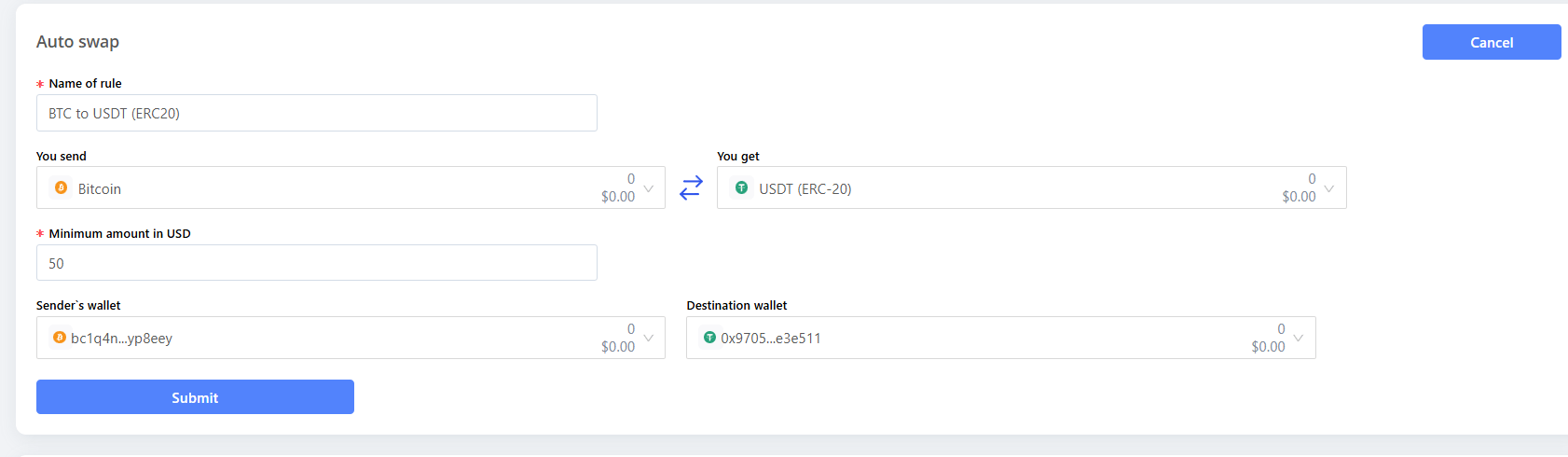
 Fill in the five fields, then click **Submit**:
* **Name of rule** — a label for your own reference (e.g. *BTC to USDT (ERC20)*).
* **You send** — the currency to convert.
* **You get** — the currency to receive.
* **Minimum amount in USD** — the threshold. When a top-up brings the sender wallet to at least this value, the swap fires.
* **Sender's wallet** — the wallet that's watched; its incoming funds get converted.
* **Destination wallet** — where the converted currency lands.
Fill in the five fields, then click **Submit**:
* **Name of rule** — a label for your own reference (e.g. *BTC to USDT (ERC20)*).
* **You send** — the currency to convert.
* **You get** — the currency to receive.
* **Minimum amount in USD** — the threshold. When a top-up brings the sender wallet to at least this value, the swap fires.
* **Sender's wallet** — the wallet that's watched; its incoming funds get converted.
* **Destination wallet** — where the converted currency lands.
 The saved rule appears in the Auto swap card, with edit and delete controls. It's now active and will run on the next qualifying replenishment.
 Auto-swap relies on **auto-sign being enabled** (it's on by default). If auto-sign is off, the rule can't execute. See **Secure your account** for the auto-sign setting.
Each auto-swap is a live exchange, so it carries the usual swap cost — the network (miner) fee plus the third-party exchange provider's fee, taken from the amount converted. Conversions run on mainnet.
Auto-swap relies on **auto-sign being enabled** (it's on by default). If auto-sign is off, the rule can't execute. See **Secure your account** for the auto-sign setting.
Each auto-swap is a live exchange, so it carries the usual swap cost — the network (miner) fee plus the third-party exchange provider's fee, taken from the amount converted. Conversions run on mainnet.