> ## Documentation Index
> Fetch the complete documentation index at: https://guide.crypto-now.io/llms.txt
> Use this file to discover all available pages before exploring further.
# Permanent deposit addresses
> Give each customer a fixed deposit address — minted by the API when they start a deposit — so repeat deposits always credit, funds settle to your treasury, and a callback fires on every payment.
For deposit-driven businesses (casinos, brokers, prop firms), each customer gets a **permanent** deposit address they reuse for every deposit. Your platform calls the API to mint that address the moment a customer starts a deposit, shows it natively in your own UI, and funds sweep into your account (treasury) wallet automatically — with a **callback** on every payment so you can credit the user. A returning customer reuses the **same address**, so repeat deposits are never lost.
The deposit loop:
picks a method and confirms.
on-demand — the address is minted at this moment.
natively, no redirect.
they land at the address.
you credit the user in your system.
**Static client wallet vs checkout charge — critical.** A client wallet assigned to a customer is **permanent**: repeat deposits to the same address are **always credited**. A checkout charge mints a **single-use** wallet — re-sending to a previous charge address is **not tracked**. "Same address every time" applies to client wallets only.
## 1. Set the callback URL, then generate API keys
Order matters: set the **Callback Url** *first*, Submit, and only **then** generate keys. In **Settings → Account Data**, enter your callback endpoint, Submit, then click **Generate new API keys** — you get a **Public key** and **Private key**.
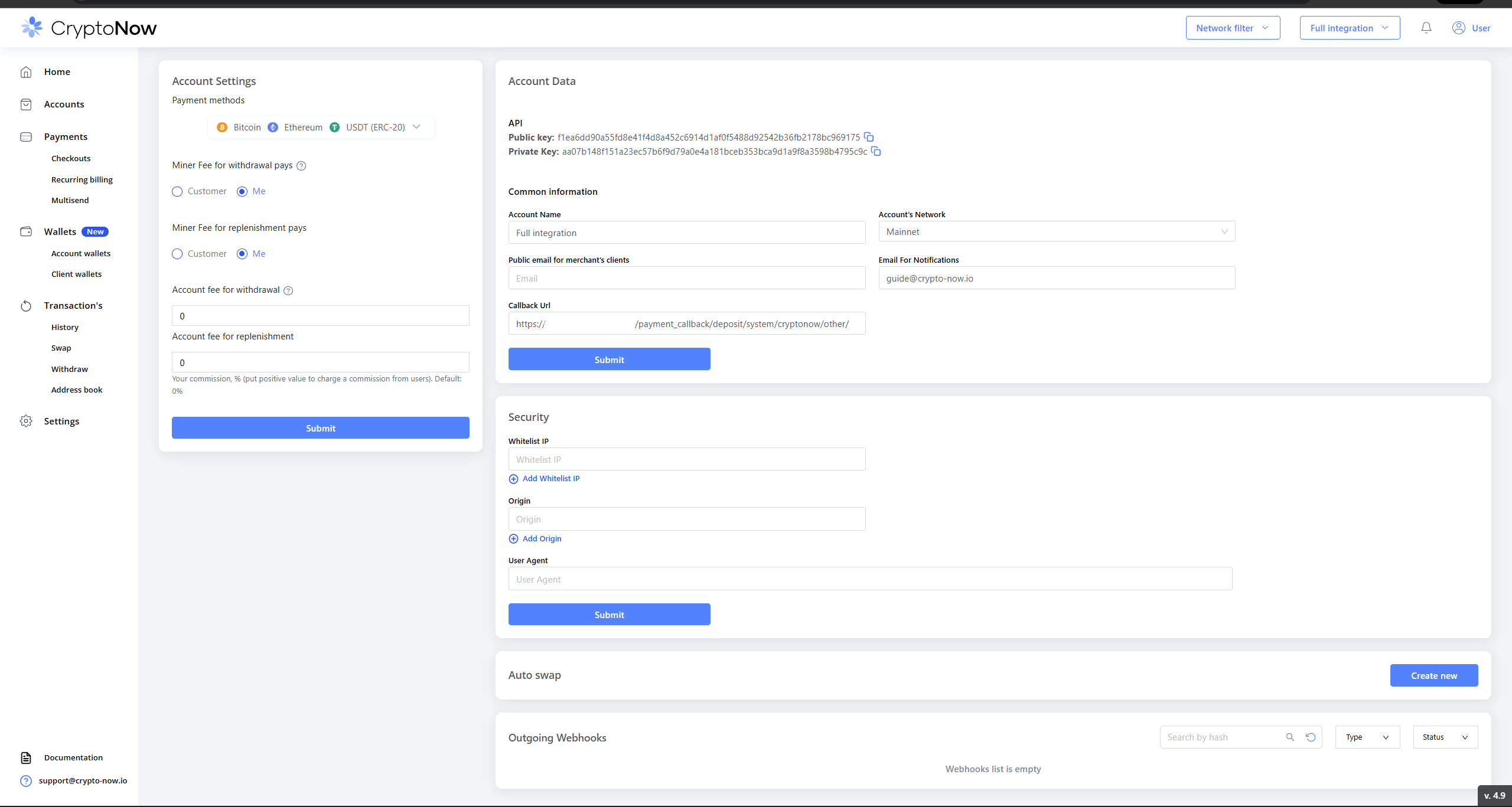 The **Private key** is server-side only — never ship it to the browser. Treat the keys and the passphrase below as secrets.
## 2. Get your account wallet's Wallet ID + passphrase
Wallet operations (and withdrawals) need the **account wallet's Wallet ID + passphrase** for the network you settle on — here the **EVM / Ethereum** account wallet. In **Wallets → Account wallets**, open the wallet's menu → **Passphrase** → **Send code** (passes 2FA) → the **Wallet ID** and **Passphrase** are revealed.
The **Private key** is server-side only — never ship it to the browser. Treat the keys and the passphrase below as secrets.
## 2. Get your account wallet's Wallet ID + passphrase
Wallet operations (and withdrawals) need the **account wallet's Wallet ID + passphrase** for the network you settle on — here the **EVM / Ethereum** account wallet. In **Wallets → Account wallets**, open the wallet's menu → **Passphrase** → **Send code** (passes 2FA) → the **Wallet ID** and **Passphrase** are revealed.
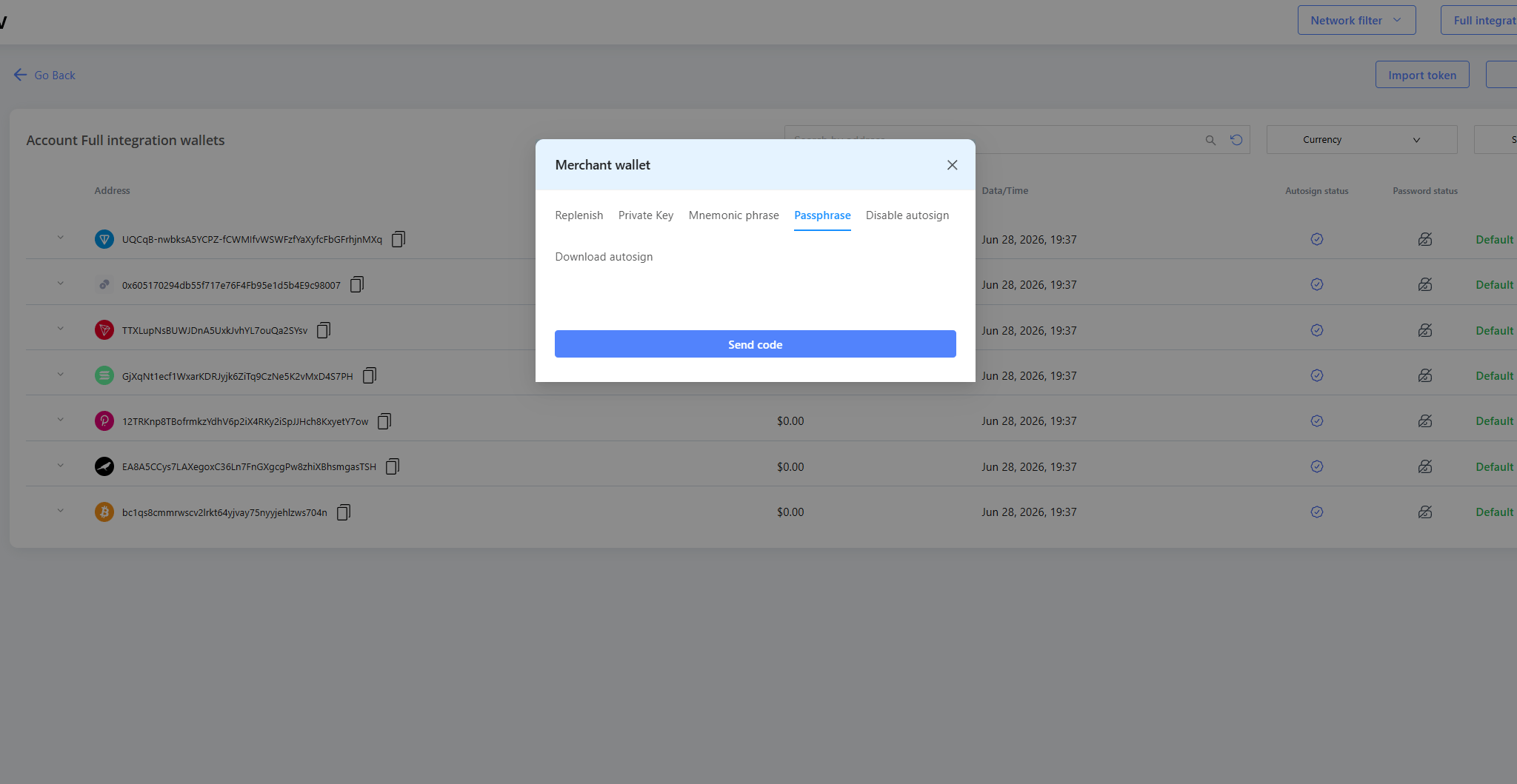
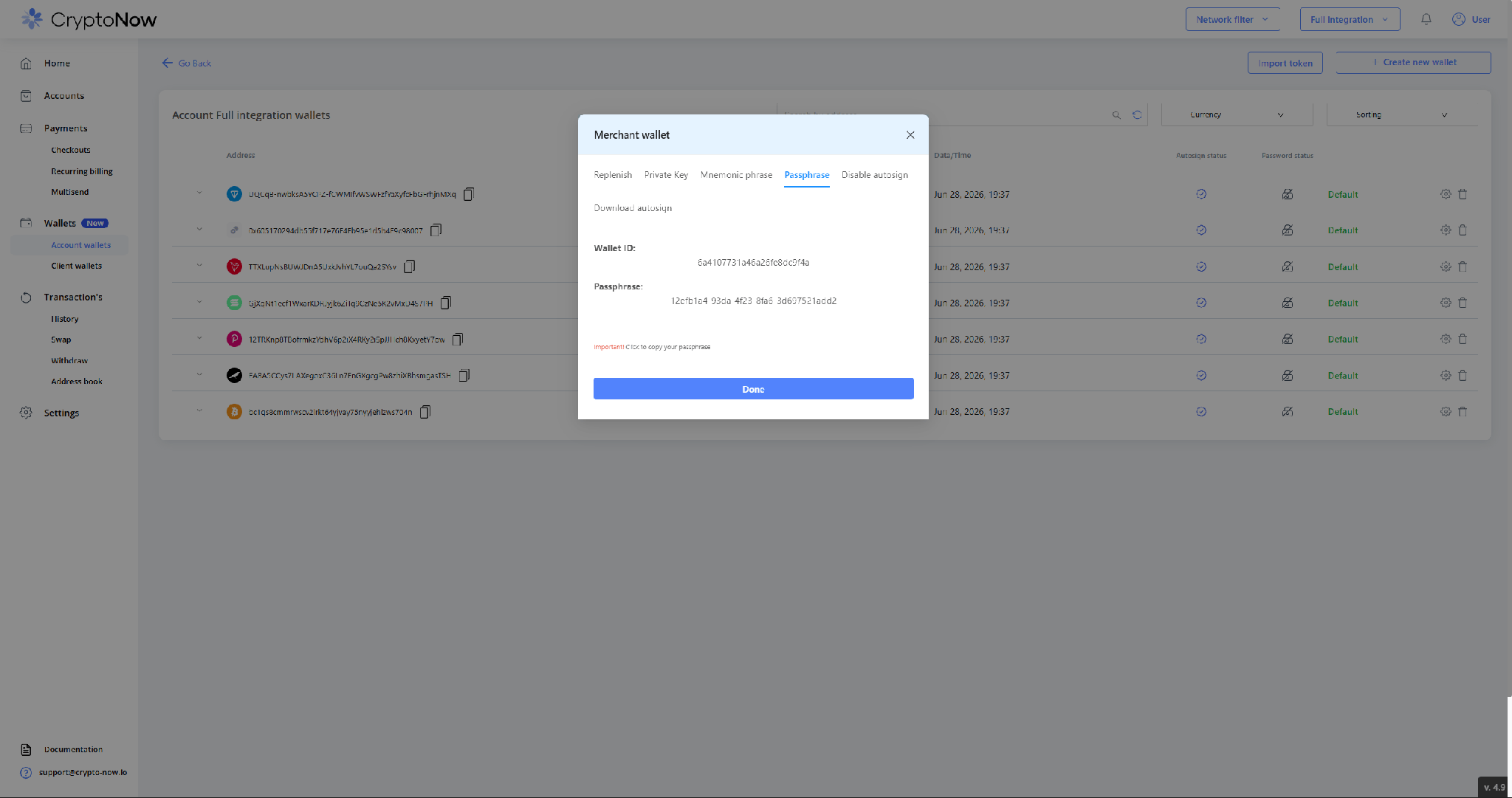 This is the **account** wallet's ID. You never fetch a client wallet's ID — client wallets are created **by the API**, on demand, in the next step.
## 3. The customer starts a deposit — and the wallet is minted
In your platform's deposit screen, the customer picks the method and clicks **Confirm**.
This is the **account** wallet's ID. You never fetch a client wallet's ID — client wallets are created **by the API**, on demand, in the next step.
## 3. The customer starts a deposit — and the wallet is minted
In your platform's deposit screen, the customer picks the method and clicks **Confirm**.
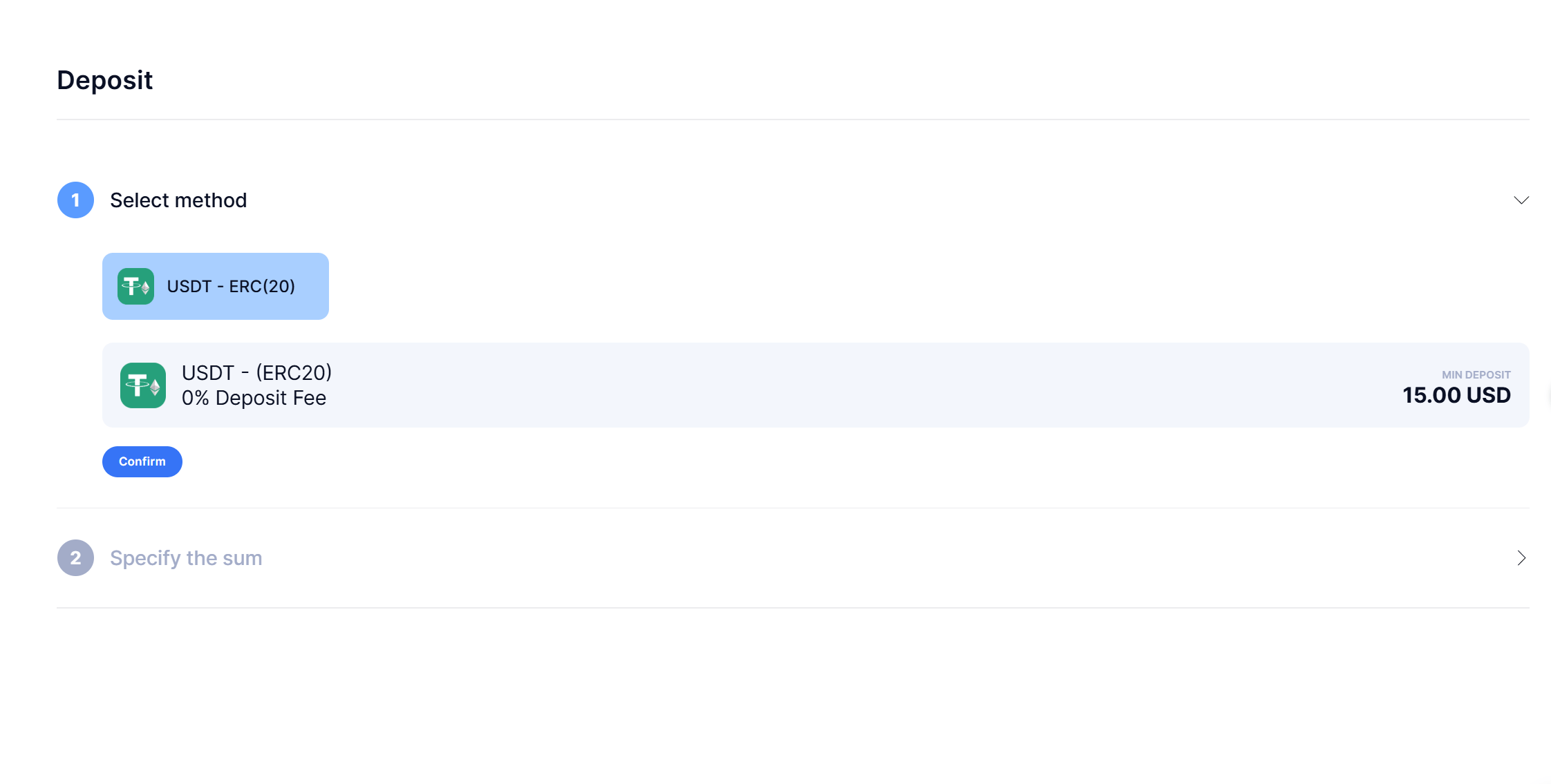 That **Confirm** is what triggers your backend to call the API. API base: `https://napi.crypto-now.io`. Authenticate with the keys, look up the `currencyId` for the network, then create the client wallet (`typeWallet: user`) — the response's `address` is what you display.
```bash theme={"system"}
# 1. Authenticate → JWT
curl -X POST https://napi.crypto-now.io/api/public/auth \
-H "Content-Type: application/json" \
-d '{ "publicKey": "", "privateKey": "" }'
# → { "token": "" }
```
```bash theme={"system"}
# 2. Find the currencyId (e.g. USDT-ERC20)
curl https://napi.crypto-now.io/api/public/currency \
-H "Authorization: Bearer "
```
```bash theme={"system"}
# 3. Create the user's client wallet → returns its address
curl -X POST https://napi.crypto-now.io/api/public/wallet/ \
-H "Authorization: Bearer " \
-H "Content-Type: application/json" \
-d '{ "typeWallet": "user" }'
# → { "data": { "id": "", "address": "0x...", "passphrase": "..." } }
```
Your platform shows the returned **address + QR**:
That **Confirm** is what triggers your backend to call the API. API base: `https://napi.crypto-now.io`. Authenticate with the keys, look up the `currencyId` for the network, then create the client wallet (`typeWallet: user`) — the response's `address` is what you display.
```bash theme={"system"}
# 1. Authenticate → JWT
curl -X POST https://napi.crypto-now.io/api/public/auth \
-H "Content-Type: application/json" \
-d '{ "publicKey": "", "privateKey": "" }'
# → { "token": "" }
```
```bash theme={"system"}
# 2. Find the currencyId (e.g. USDT-ERC20)
curl https://napi.crypto-now.io/api/public/currency \
-H "Authorization: Bearer "
```
```bash theme={"system"}
# 3. Create the user's client wallet → returns its address
curl -X POST https://napi.crypto-now.io/api/public/wallet/ \
-H "Authorization: Bearer " \
-H "Content-Type: application/json" \
-d '{ "typeWallet": "user" }'
# → { "data": { "id": "", "address": "0x...", "passphrase": "..." } }
```
Your platform shows the returned **address + QR**:
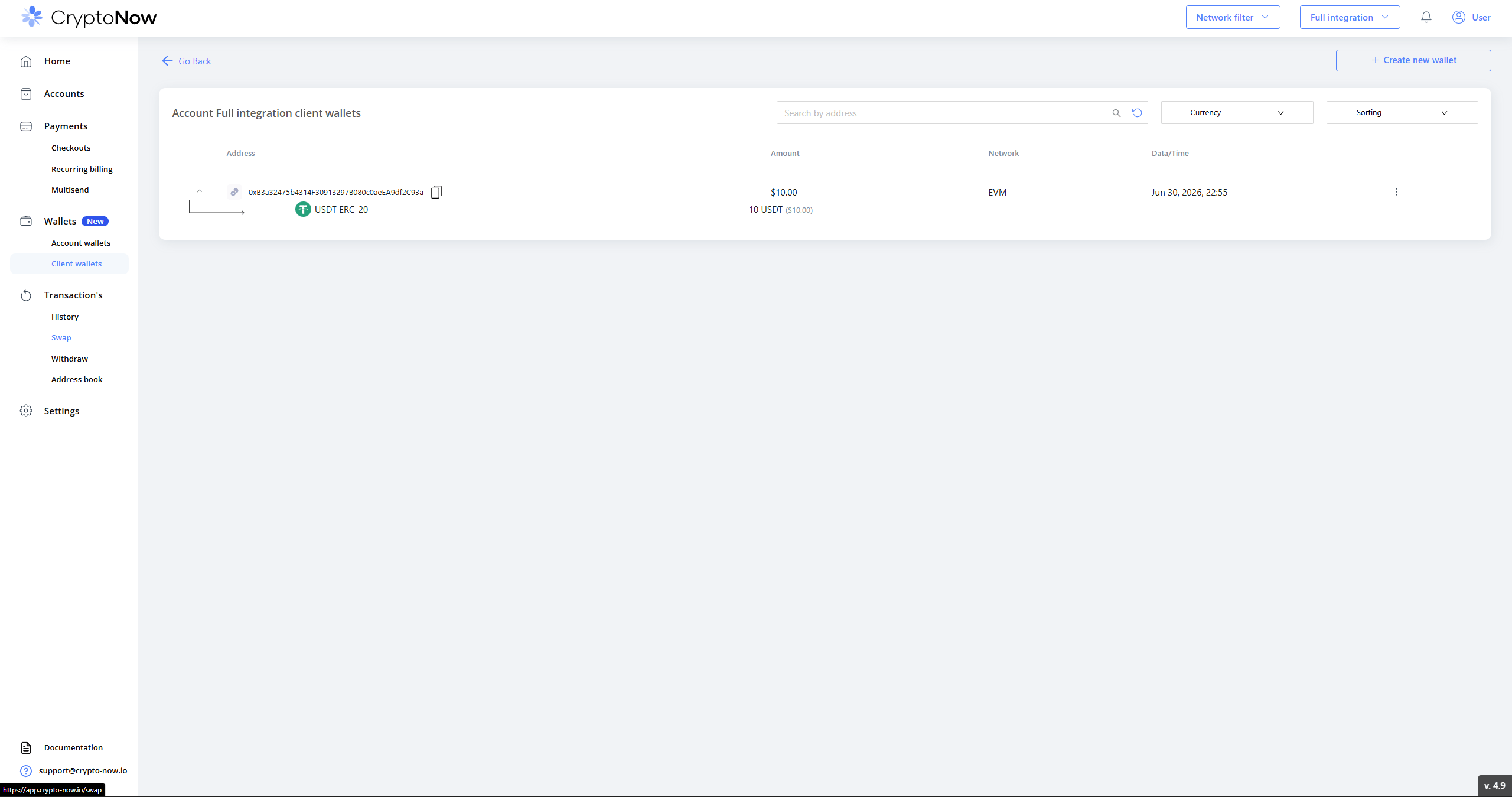
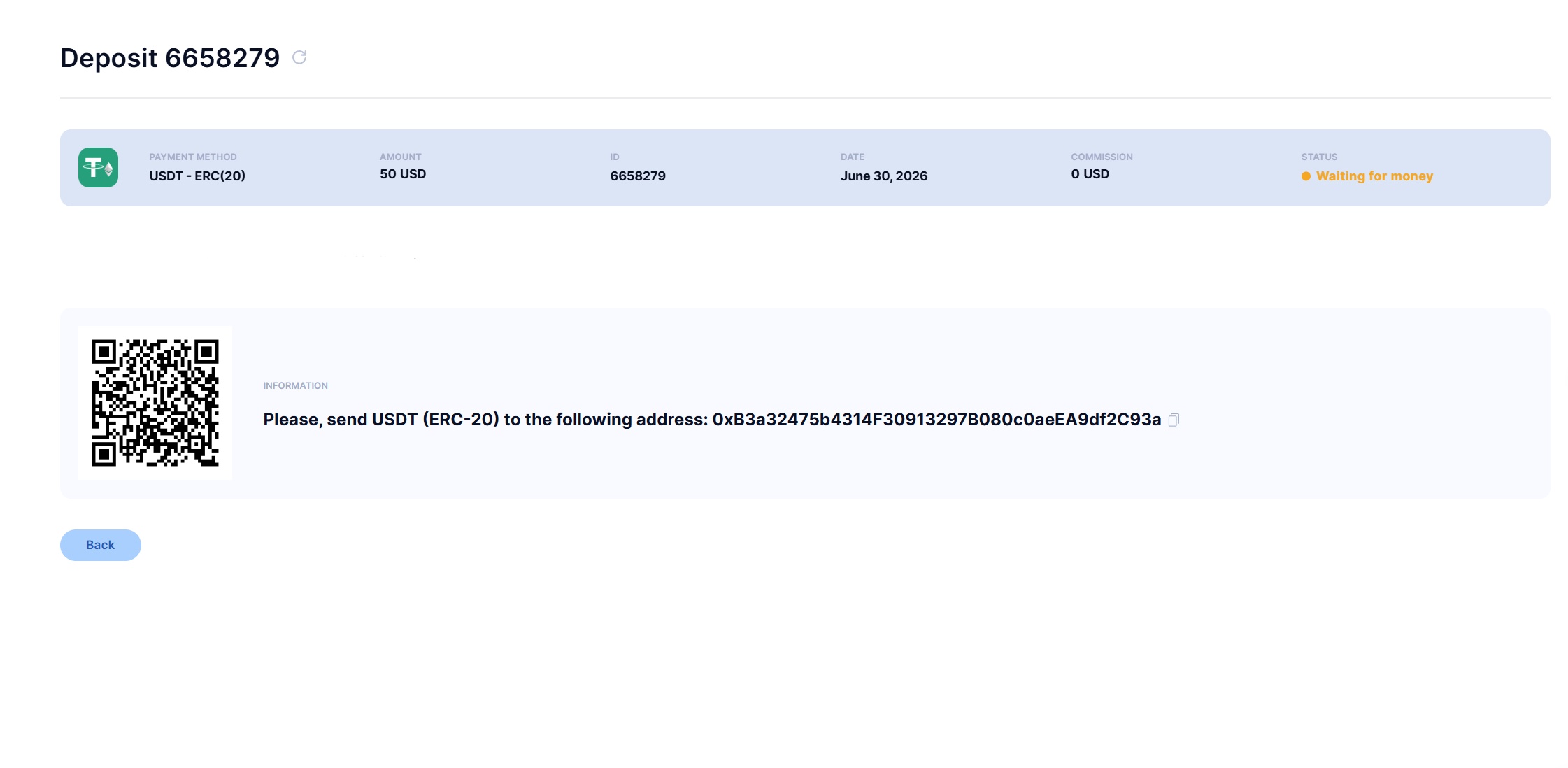 Store `user → { walletId, address }` and reuse it for that user. The wallet you just minted now appears in CryptoNow under **Client wallets** at `$0.00` — it didn't exist before the customer confirmed:
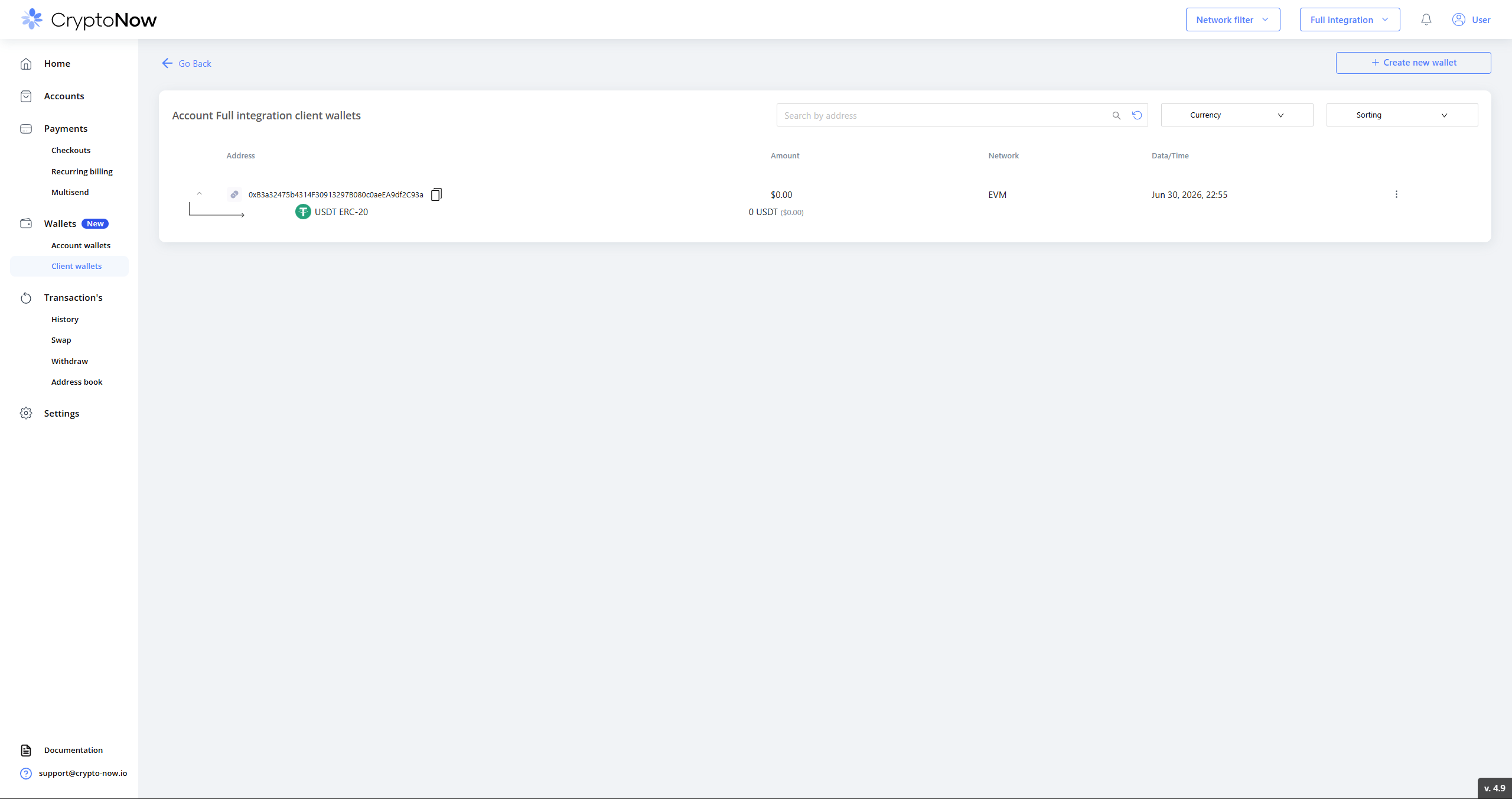 There's also a Node SDK — `crypto-now-node-api-sdk` (npm) — wrapping these calls.
## 4. Repeat deposits reuse the same address
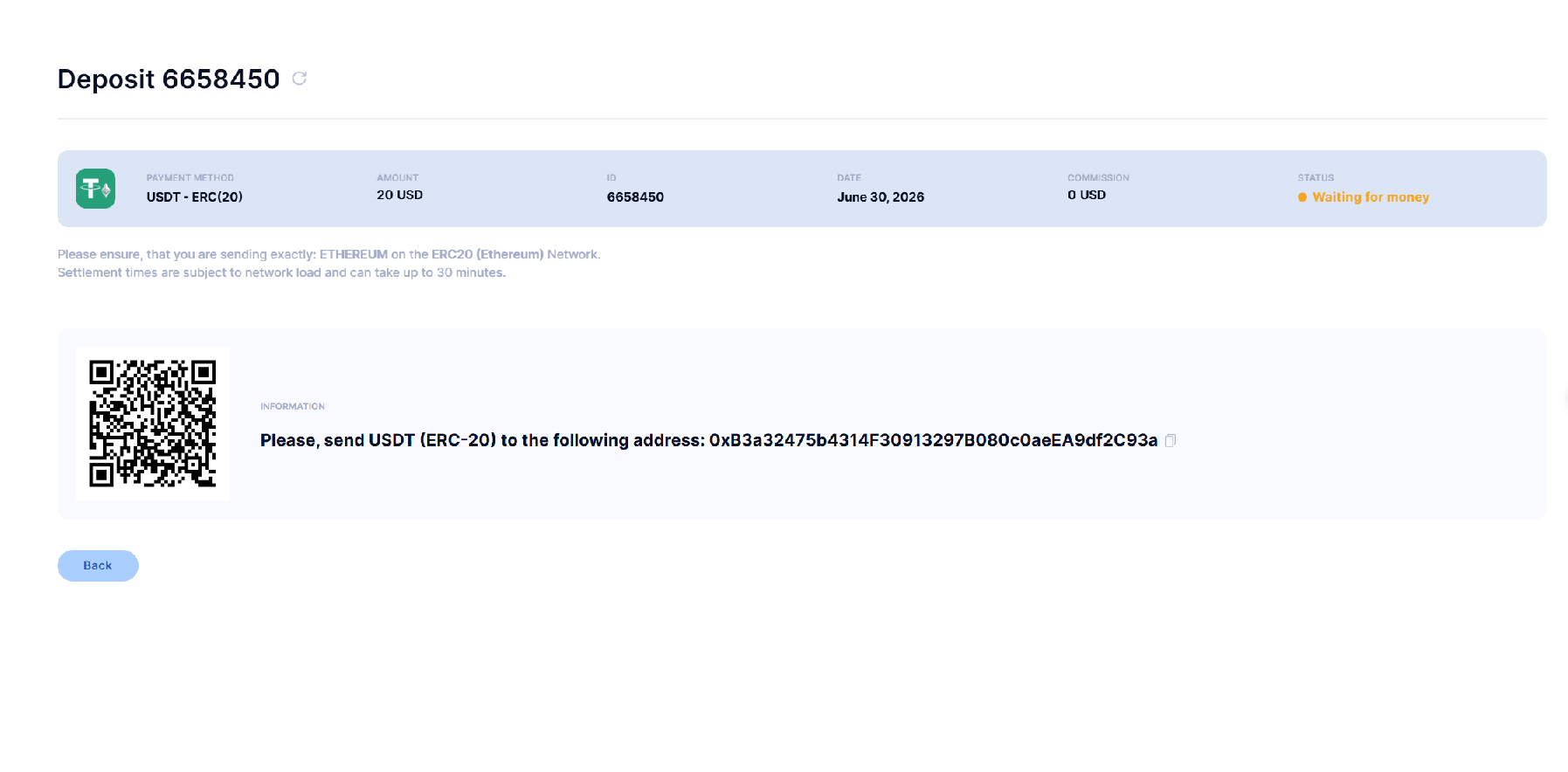
Because you stored and reuse the wallet, a returning customer gets the **same address**. Below, a second, separate deposit (different deposit ID) resolves to the identical address — so a customer who re-uses an old address is still credited.
There's also a Node SDK — `crypto-now-node-api-sdk` (npm) — wrapping these calls.
## 4. Repeat deposits reuse the same address
Because you stored and reuse the wallet, a returning customer gets the **same address**. Below, a second, separate deposit (different deposit ID) resolves to the identical address — so a customer who re-uses an old address is still credited.
 ## 5. The customer pays
Once the payment lands, your platform shows it as deposited:
## 5. The customer pays
Once the payment lands, your platform shows it as deposited:
 ## 6. Receive the callback
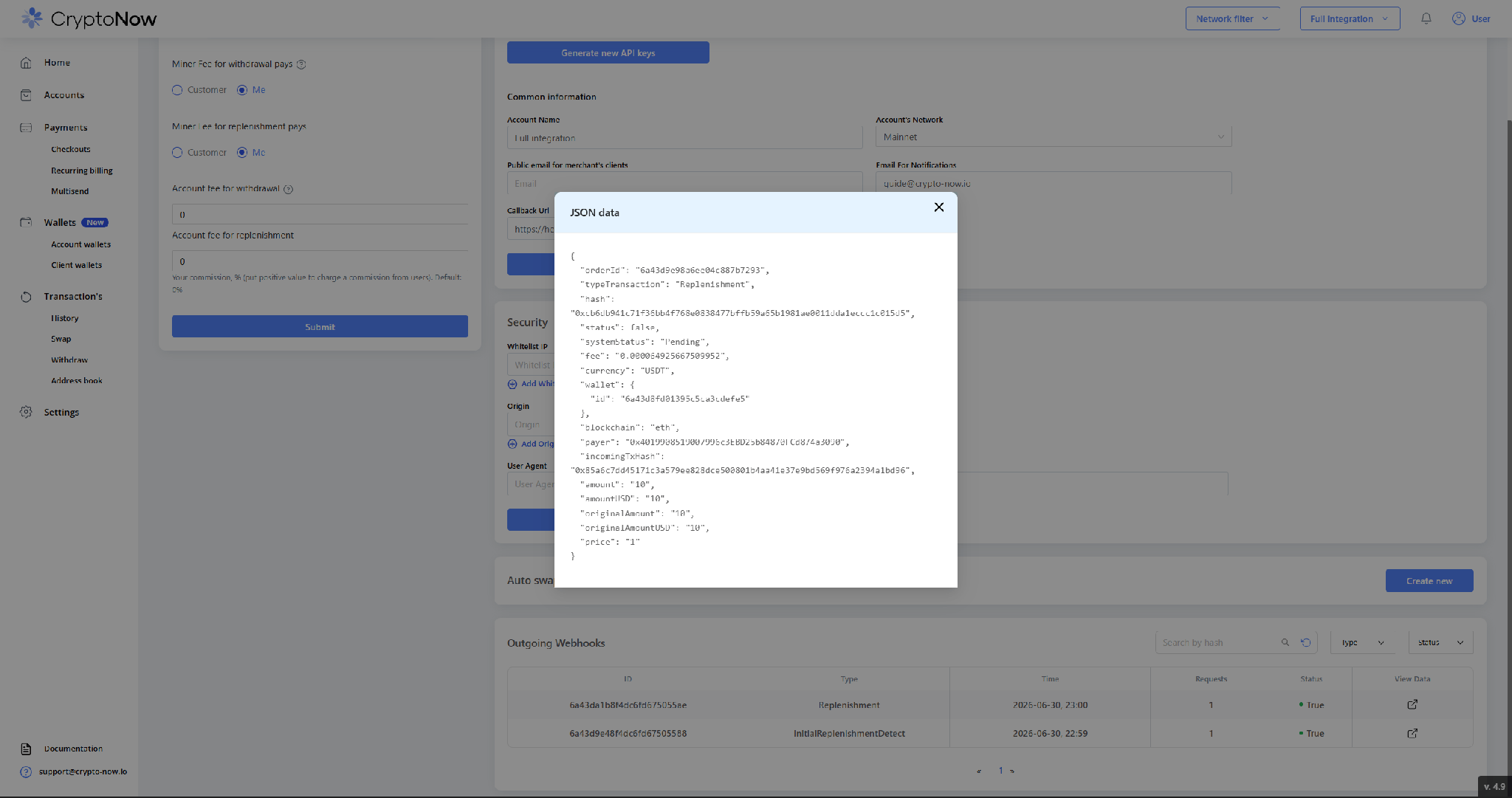
CryptoNow fires a callback to your URL on each client-wallet replenishment. The body is encrypted; the JWT carries the `walletId` and an encrypted `salt`, so the decrypt is self-contained (decrypt code for Node / PHP / Python is in the API docs). Decrypted, it carries the transaction details you use to credit the user.
```js theme={"system"}
import CryptoJS from 'crypto-js';
const decrypt = (encrypted, salt) =>
CryptoJS.AES.decrypt(encrypted, salt).toString(CryptoJS.enc.Utf8);
// req.headers.authorization = "Bearer "; req.body.data = encrypted payload
const { id: walletId, salt } = decodeJwt(req.headers.authorization.slice(7));
const finalSalt = decrypt(salt, walletId);
const payload = JSON.parse(decrypt(req.body.data, finalSalt));
// → { typeTransaction: "Replenishment", currency: "USDT", amount: "10",
// wallet: { id }, payer, incomingTxHash, ... }
```
Confirm deliveries under **Settings → Outgoing Webhooks** — an `InitialReplenishmentDetect` then a `Replenishment`, both delivered (Status `True`):
## 6. Receive the callback
CryptoNow fires a callback to your URL on each client-wallet replenishment. The body is encrypted; the JWT carries the `walletId` and an encrypted `salt`, so the decrypt is self-contained (decrypt code for Node / PHP / Python is in the API docs). Decrypted, it carries the transaction details you use to credit the user.
```js theme={"system"}
import CryptoJS from 'crypto-js';
const decrypt = (encrypted, salt) =>
CryptoJS.AES.decrypt(encrypted, salt).toString(CryptoJS.enc.Utf8);
// req.headers.authorization = "Bearer "; req.body.data = encrypted payload
const { id: walletId, salt } = decodeJwt(req.headers.authorization.slice(7));
const finalSalt = decrypt(salt, walletId);
const payload = JSON.parse(decrypt(req.body.data, finalSalt));
// → { typeTransaction: "Replenishment", currency: "USDT", amount: "10",
// wallet: { id }, payer, incomingTxHash, ... }
```
Confirm deliveries under **Settings → Outgoing Webhooks** — an `InitialReplenishmentDetect` then a `Replenishment`, both delivered (Status `True`):
 If you passed a `clickId` when creating the charge/wallet, it comes back as `outsideOrderId` — use it to map the payment to your order/user.
## 7. Settlement: throughput vs. actual balance
The **client wallet** doesn't hold funds — it sweeps everything to your account wallet — so the figure it shows is **cumulative throughput**, not a live balance. Here it reads **10 USDT** (the amount that passed through):
If you passed a `clickId` when creating the charge/wallet, it comes back as `outsideOrderId` — use it to map the payment to your order/user.
## 7. Settlement: throughput vs. actual balance
The **client wallet** doesn't hold funds — it sweeps everything to your account wallet — so the figure it shows is **cumulative throughput**, not a live balance. Here it reads **10 USDT** (the amount that passed through):
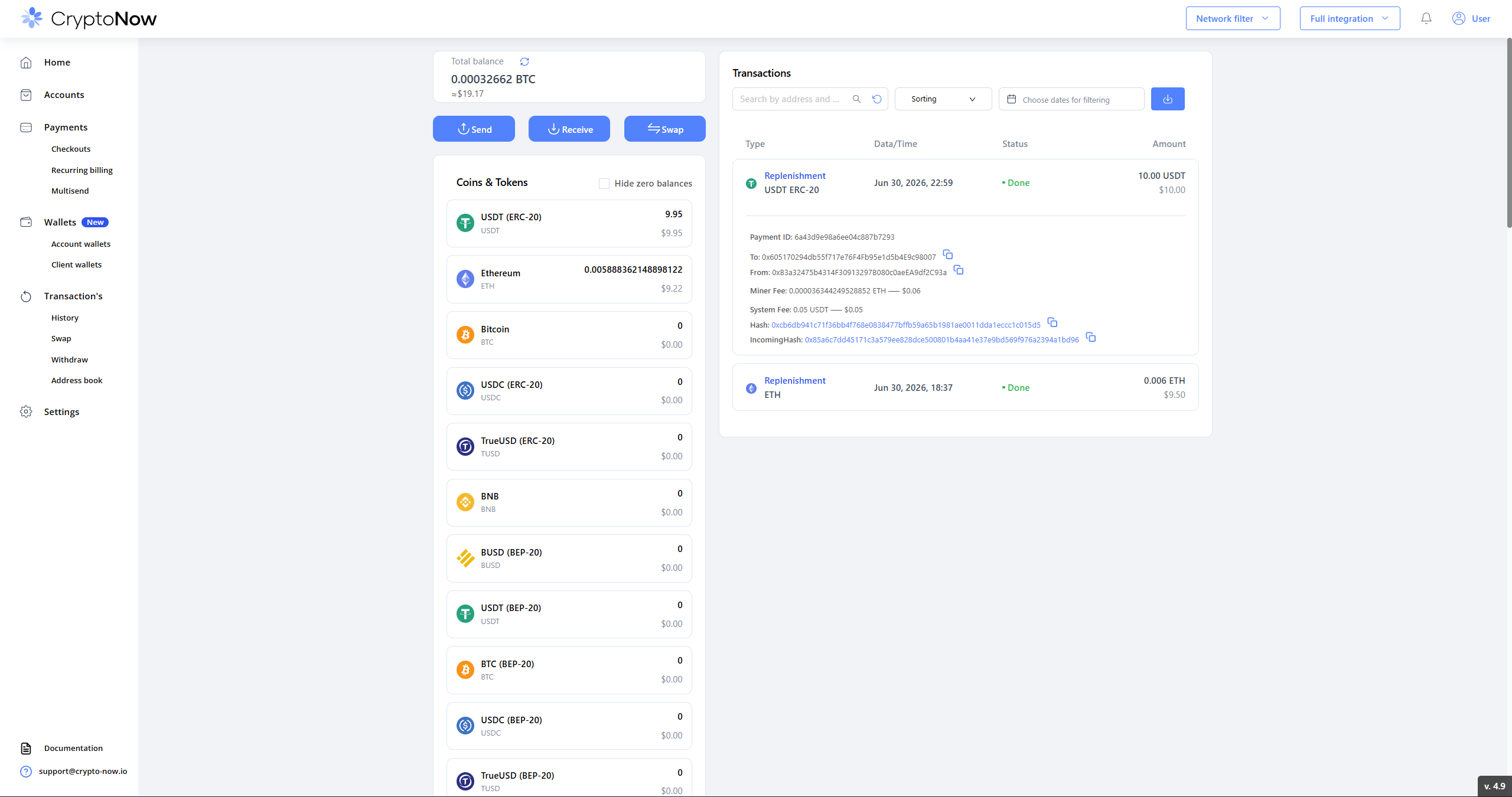
 The **account wallet** holds the actual funds: **9.95 USDT** — the 10 USDT deposit minus the **0.5% system fee** (0.05 USDT) on replenishment. The swept replenishment transaction shows the client → account hop, the miner fee (paid in ETH from the account wallet) and the on-chain hashes.
 This whole flow relies on **auto-sign being ON** (the default). It fronts gas for the sweep and lets the callback complete — disabling it breaks deposits. See **Secure your account**.